
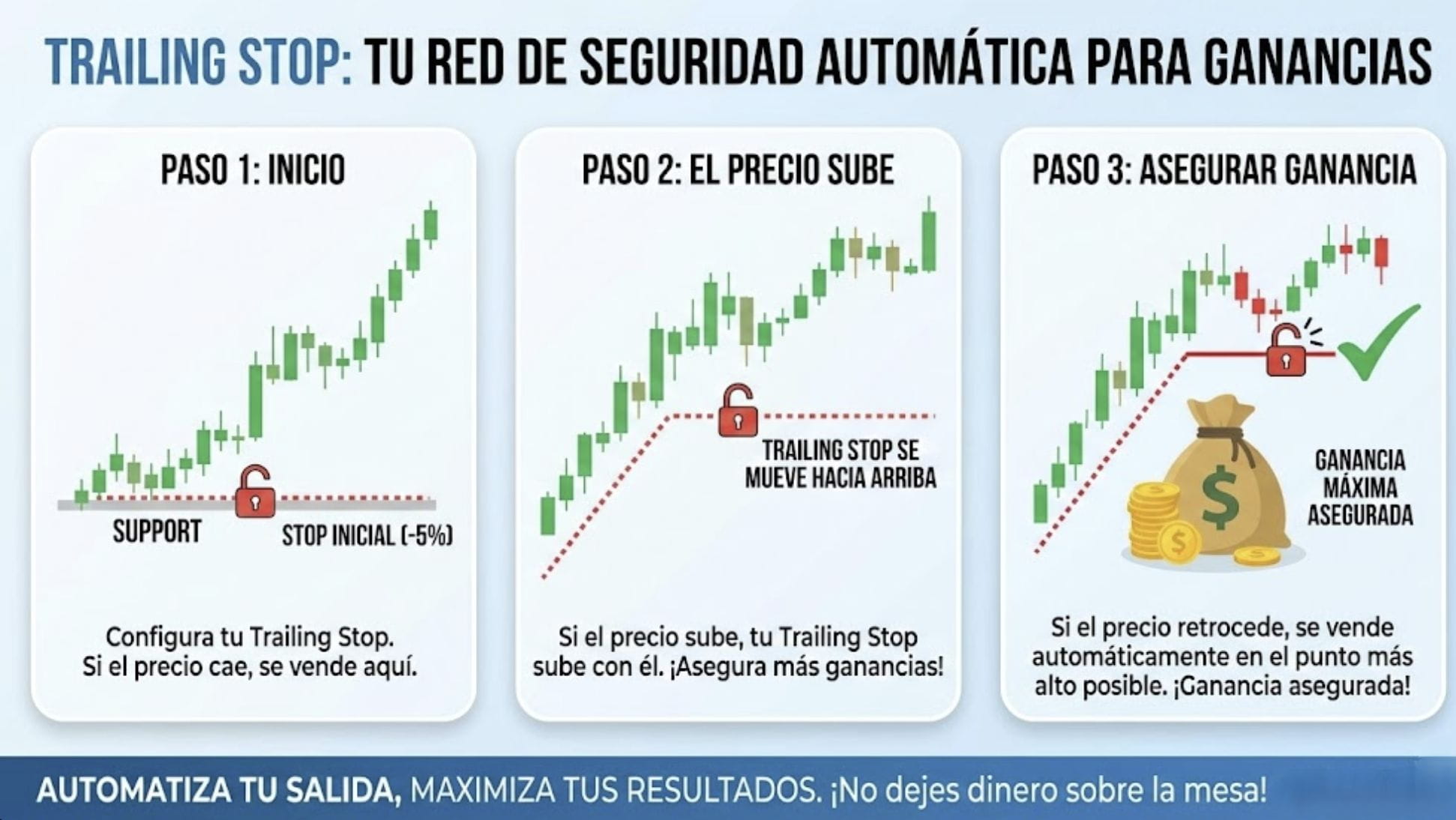
We've all been there. You enter a trade, see green numbers, get nervous, and close to secure the profit. 😅
Five minutes later... you look at the chart and the price has shot up another 20%. 📈 You’re left thinking, "why did I exit so soon?".
The crypto market is volatile and strong trends can last much longer than we think. The problem is that the fear of losing what we’ve gained makes us exit too early.
Here is where your best ally comes in: the Trailing Stop (Dynamic Stop). 🛡️
🧠 What is it and how does it work?
Imagine that your Stop Loss is not a fixed wall, but a "bodyguard" that chases the price.
If the price goes up: The Trailing Stop automatically moves up behind it, maintaining a distance that you define (for example, 2% or 5%).
If the price goes down: The Trailing Stop STAYS STILL. It does not retreat. 🛑
💡 Why use it?
The goal is simple: Let profits run and cut losses.
Instead of trying to guess what the maximum point will be (something almost impossible), you let the market take you out only when the trend has truly reversed.
✅ Practical example:
You buy Bitcoin at 90k. You set a Trailing Stop $1,000 away.
If BTC goes up to 95k -> Your Stop automatically goes up to 94k.
If BTC goes up to 100k -> Your Stop automatically goes up to 99k.
If suddenly BTC drops to 98k -> Boom! Your order closes at 99k.
You captured almost the entire rise without having to be glued to the screen moving the Stop manually.
Disciplined Trader Mindset 🧠
The novice trader seeks to "guess the top." The professional trader knows that they don't have a crystal ball and prefers to secure profit automatically while giving the price room to breathe.
It's not about winning at the highest point; it's about getting the most out of the movement without the risk of giving it all back to the market.
How to activate it on Binance?
It's simpler than it seems. Follow these steps in your trading panel (especially useful in Futures):
Go to the orders panel (where you usually see "Limit" or "Market").
Expand the menu and select Trailing Stop.
Return rate (Callback Rate): This is the key data. It defines the percentage of retracement (e.g. 1%, 2%, 5%). It is the "distance" that the stop will maintain relative to the current price.
Activation price: (Optional) You can tell the system that the Trailing should only activate when the price reaches a specific profit level.
💎 PRO TIP to not "choke" the trade:
Be careful with setting a very small percentage! If you set a return rate of 0.2% on a very volatile currency, the market will take you out with the normal "noise" of the price before it really goes up.
Give it space to breathe. Analyze the average volatility of the currency before choosing your percentage.
💬 Tell me:
Do you usually move your Stop Loss manually as you gain (manual Trailing) or do you prefer the system to do it for you? 👇
This content is strictly educational and reflects a personal opinion. It does not constitute financial or investment advice. Cryptocurrency trading involves a high level of risk. Manage your capital responsibly and research on your own.




#RiskManagemen #TradingTips #CryptoEducation #BinanceSquare #TrailingStop