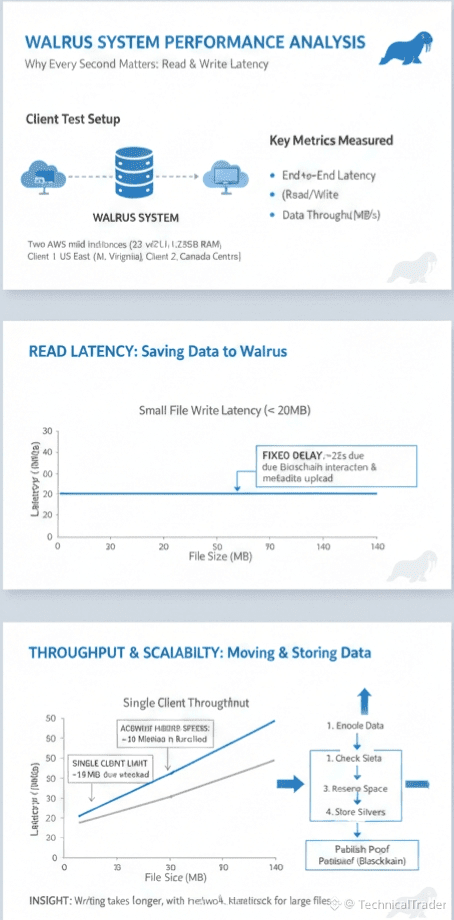
We wanted to really understand how well this system works so we tested it from your perspective. We set up a specific test environment to mimic real life usage. We utilized two separate clients running on powerful cloud computers to get accurate data.
The Hardware We Used to Test Walrus
We did not want to use slow machines that might skew the results. We used very strong instances known as AWS m5d to ensure we had enough power. These machines had thirty two processors and lots of memory to handle the workload.
Where We Located the Test Clients
Location matters a lot when you are sending data across the internet. We placed one client in the US East region specifically in North Virginia. The other client was placed in Canada Central to capture a different geographic perspective.
Measuring How Fast You Can Read Data
The first thing we looked at was how long it takes for you to get your data back. We call this end to end latency. We start the timer before the client asks for the file and stop it when the confirmation arrives.
What We Found About Reading Speed in Walrus
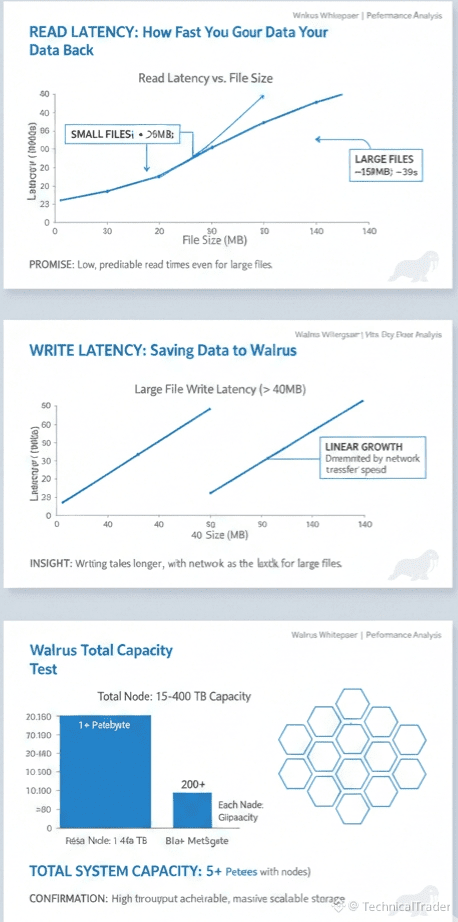
The results from our tests were actually quite promising for you. We found that the time it takes to read data remains very low. This is true even when we tested with different sizes of data files.
Reading Small Files is Very Quick
If you are working with small files that are less than twenty megabytes you will be happy. The latency for these files stays below fifteen seconds. This means you can access your small pieces of data without a long wait.
Reading Large Files is Also Efficient
We also tested much larger files around one hundred and thirty megabytes. You might expect a long delay but the latency only increased to thirty seconds. This shows that the system handles heavier loads quite well for you.
Understanding Write Latency in Walrus
Writing data or saving it into the system is a different process than reading. We observed that writing consistently takes more time than reading does. This is something you should expect when using this kind of secure system.
The Speed of Writing Small Files
For small files under twenty megabytes the writing time is relatively flat. It usually stays under twenty five seconds for the entire operation. It does not matter if the file is very tiny or close to the limit.
Why Small Files Have a Fixed Delay
You might wonder why a tiny file takes twenty five seconds to save. This overhead happens because of the interaction with the blockchain. The system also has to upload metadata to all the storage nodes to keep things safe.
How Walrus Handles Writing Large Files
When you start uploading large files over forty megabytes the behavior changes. The time it takes starts to grow in a straight line relative to the size. This is because the network transfer becomes the main factor.
Breaking Down the Five Steps of Writing
Every time you write data the system performs five specific steps. First it encodes your data to prepare it for storage. Then it checks the status of the data to ensure everything is correct.
The Final Steps of the Writing Process
After checking status the system gets information to reserve space. Then it stores the slivers of data on the nodes. Finally it publishes a proof to the blockchain to confirm availability.
Analyzing the Delay for Small Blobs
For small pieces of data the fixed administrative work dominates the time. About six seconds are spent just on metadata and blockchain tasks. This accounts for roughly fifty percent of the total time you wait.
Analyzing the Delay for Large Blobs
When you move to large blobs the storage phase takes the most time. The administrative work remains constant but the data transfer takes longer. This confirms that for large files the network speed is the limit.
Validating Our Claims on Latency
These results help us prove an important point about the system. Walrus achieves low latency that is predictable for you. The only thing slowing it down for big files is the speed of the internet itself.
Measuring Data Throughput for You
We also looked at how many bytes per second a single client can move. For reading data this speed scales up nicely as files get bigger. This is because reading is mostly just pulling data from the network.
The Speed Limit for Single Client Writes
Writing throughput tends to flatten out around eighteen megabytes per second. This does not mean the system is slow but that a single client has limits. The client has to talk to the blockchain and nodes many times.
How You Can Achieve Higher Speeds in Walrus
This limit on a single client does not stop you from going faster. The underlying network supports much higher speeds than what we measured for one person. You can easily speed things up by changing how you work.
Using Multiple Clients for Better Speed
For much larger files you can deploy multiple clients at the same time. Each client can upload a chunk of data in parallel. This creates a fan out pattern that bypasses the single user limit.
Confirming High Throughput Capabilities
These tests validate that you can read and write at high throughput. The system is designed to handle heavy traffic if you set it up right. You just need to use parallel connections for the biggest jobs.
Testing the Scalability of Walrus
We wanted to see how much data the system could hold over a long period. We ran our evaluation over sixty days to gather enough data. We wanted to make sure it could handle real world usage patterns.
How Much Data Was Stored During Tests
During our sixty day test the system stored a median of over one terabyte of data slivers. It also stored over two hundred gigabytes of blob metadata. This shows it can handle a significant volume of information.
The Capacity of Individual Storage Nodes
As we described earlier each storage node plays a big part. Each node contributes between fifteen and four hundred terabytes of capacity. This is the foundation of the total storage power of the system.
The Massive Total Capacity of Walrus
When you add all the nodes together the system can store over five petabytes. This is a key feature that makes Walrus very powerful. It means there is plenty of room for all your data.
How Capacity Grows With More Nodes
We found that the total storage scales with the committee size. This means if you add more nodes the capacity grows proportionally. The system gets bigger and stronger as more hardware is added.
Final Thoughts on System Performance
Our tests show that Walrus is a robust system for you. It offers low latency reads and scalable writing options. It is built to grow with your needs and handle massive amounts of data.
what you think about this? don't forget to comment 💭
Follow for more content 🙂