
Bridging assets into COTI V2 is simple and flexible. Whether you’re moving COTI ERC20, stablecoins, or other major assets from Ethereum or Cardano, COTI supports multiple trusted bridging options to get you on-chain quickly.
This guide walks you through the three main ways to bridge to the COTI Network, using the COTI Native Bridge, Hyperlane Nexus Bridge, and ChainPort, plus step-by-step instructions for adding the COTI Network to your wallet so your assets show up correctly once bridged.
How to Bridge COTI ERC20 into COTI V2
The COTI Native Bridge can be used to move COTI in & out between COTI Network and Ethereum.
Start with COTI ERC20 within your self-custody wallet
Navigate to bridge.coti.io
Connect your wallet
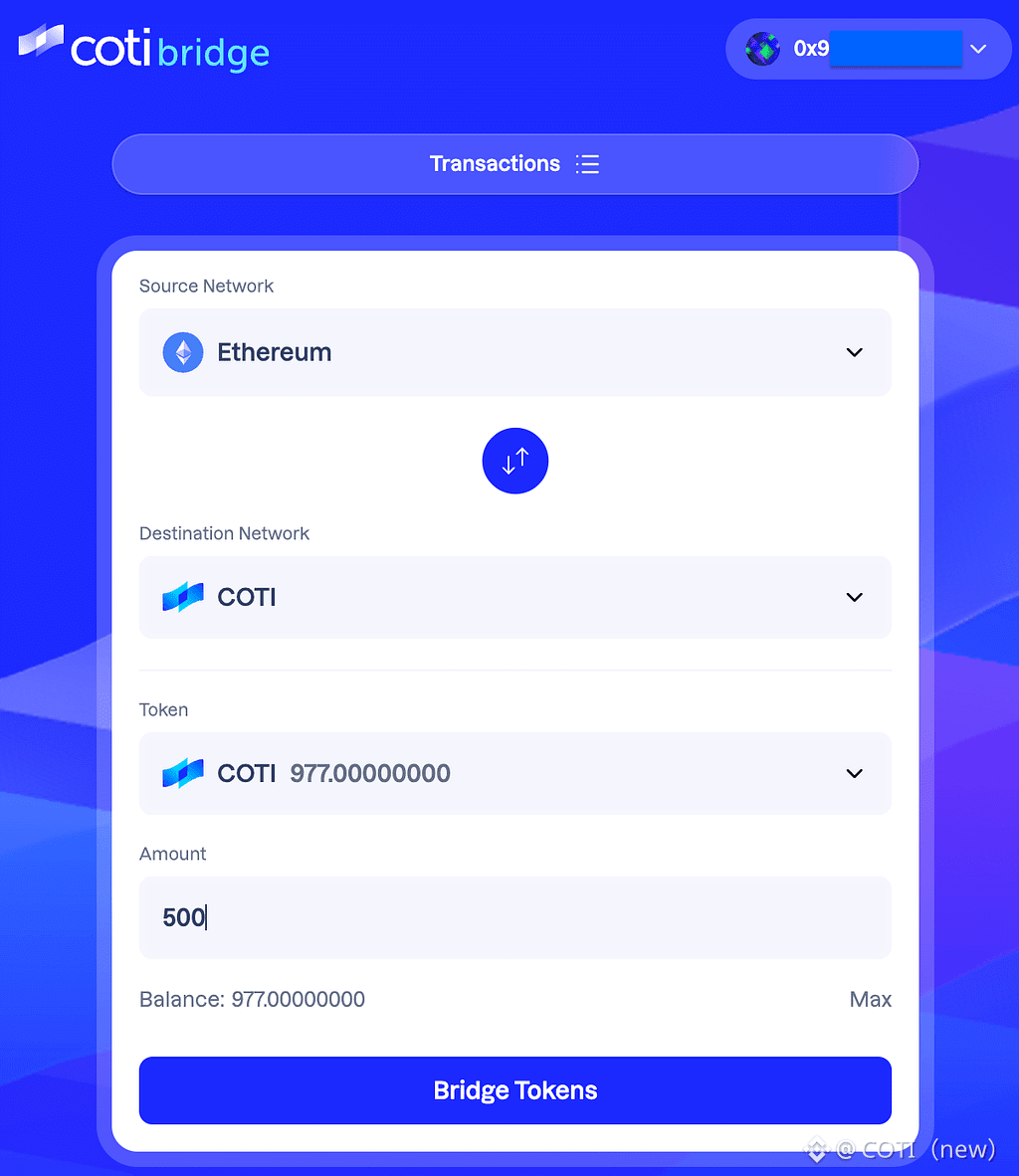
4. Enter Ethereum as the source network and COTI as the destination network
5. Enter the number of tokens that you wish to bridge
6. Hit ‘Bridge Tokens’
7. Confirm the transaction in your wallet
To view your bridged tokens you will need to add COTI Network to your wallet. Scroll to the bottom for step-by-step instructions.
📌Learn more about the COTI Native Bridge in our Docs
Using Hyperlane to Bridge to COTI Network
Bridge quickly and seamlessly from Ethereum to COTI Network using Hyperlane’s Nexus Bridge. The bridge offers conversions from USDC, ETH and BTC. In the following guide we will show you how to bridge USDC on Ethereum to USDC.e, on the COTI Network.
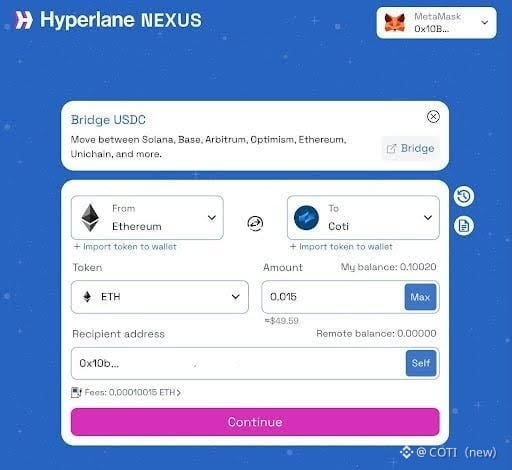
Navigate to the Nexus Bridge here
Connect your wallet.
Choose the Source chain (e.g. Ethereum) and the asset you want to bridge: USDC → USDC.e
Add the amount you want to bridge.
Set destination chain to COTI Mainnet.
Review fees and estimated arrival time.
✅ Approve & Bridge
To view your newly bridged tokens in your wallet add the relevant network address as follows:
USDC on COTI (USDC.e): 0xf1Feebc4376c68B7003450ae66343Ae59AB37D3C
ETH on COTI (wETH): 0x639aCc80569c5FC83c6FBf2319A6Cc38bBfe26d1
BTC on COTI (wBTC): 0x8C39B1fD0e6260fdf20652Fc436d25026832bfEA
📌 New to adding contract addresses? Scroll down for step-by-step instructions on how to add a contract address to MetaMask.
Using ChainPort to bridge to the COTI Network.
ChainPort is the newest bridging option on COTI, enabling seamless transfers of USDT from Ethereum and ADA from Cardano directly into the COTI Network using a secure, non-custodial bridge.
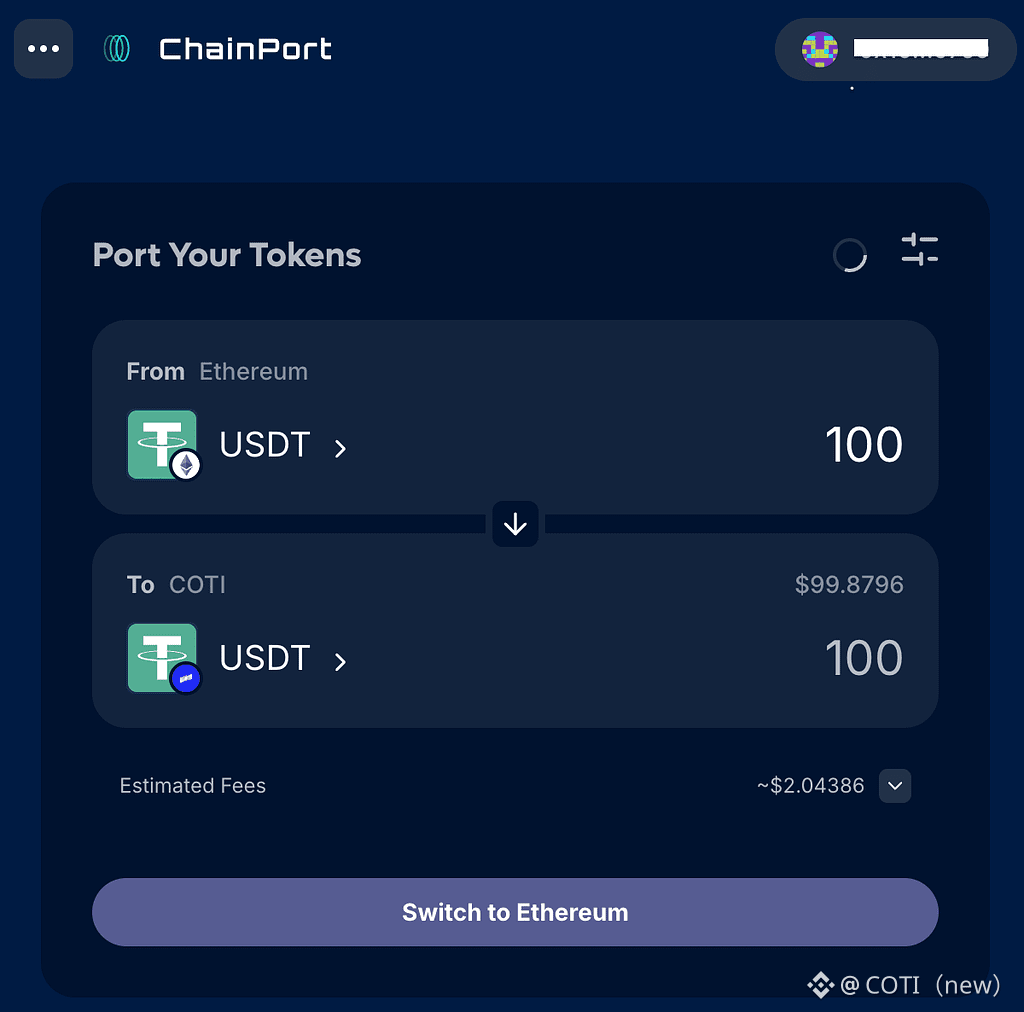
Head to app.chainport.io and connect your wallet.
Use MetaMask to bridge USDT or a Cardano wallet to bridge ADA (e.g. Nami, Eternl, Yoroi.)Select Chains & Tokens as follows:
To bridge ADA: Choose Cardano as source, ADA as token, COTI as destination.
To bridge USDT: Choose Ethereum as source, USDT as token, COTI as destination.
3. Confirm & Receive.
4. Review fees/gas, approve.
5. To view your newly bridged tokens in your wallet add the relevant network address as follows:
wADA on COTI: 0xe757Ca19d2c237AA52eBb1d2E8E4368eeA3eb331
USDT on COTI: 0xfA6f73446b17A97a56e464256DA54AD43c2Cbc3E
💡 You can reverse the direction for USDT / ADA bridging. The process works the same, just swap the source and target chains.
How to Add Custom Networks to Your Wallet
How to Add COTI Network to your wallet:
Open your MetaMask wallet
Click on the dropdown of networks and select Add a Custom Network
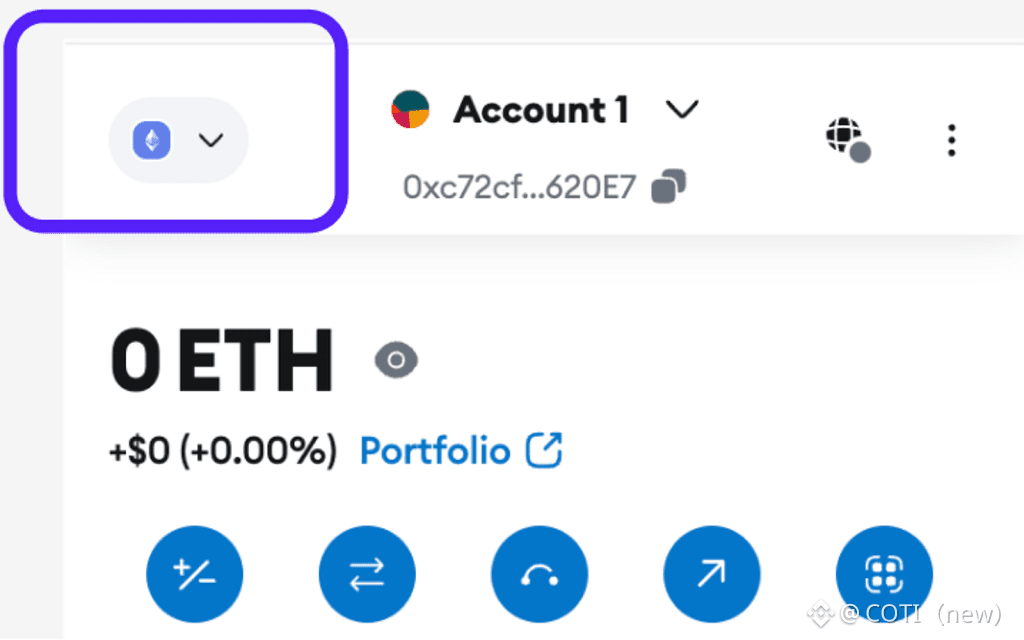
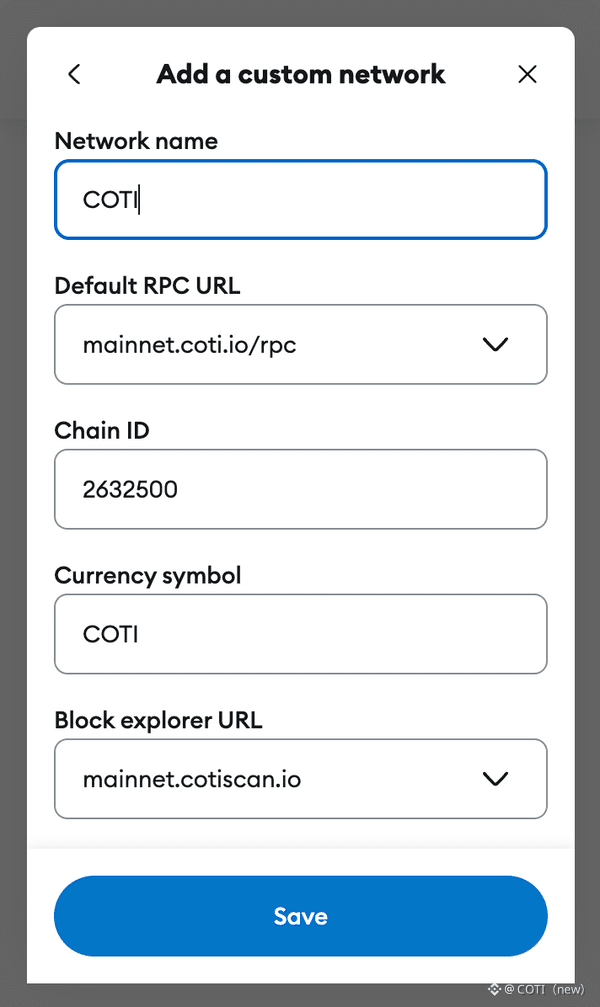
3. Fill in the following information to add the COTI Network:
• Network Name: COTI
• Default RPC URL: https://mainnet.coti.io/rpc
• Chain ID: 2632500
• Currency Symbol: COTI
• Block Explorer URL: https://mainnet.cotiscan.io
4. Hit Save
How to Add Additional Networks to your wallet
Open your MetaMask wallet
Click on the dropdown of networks and select Add a Custom Network
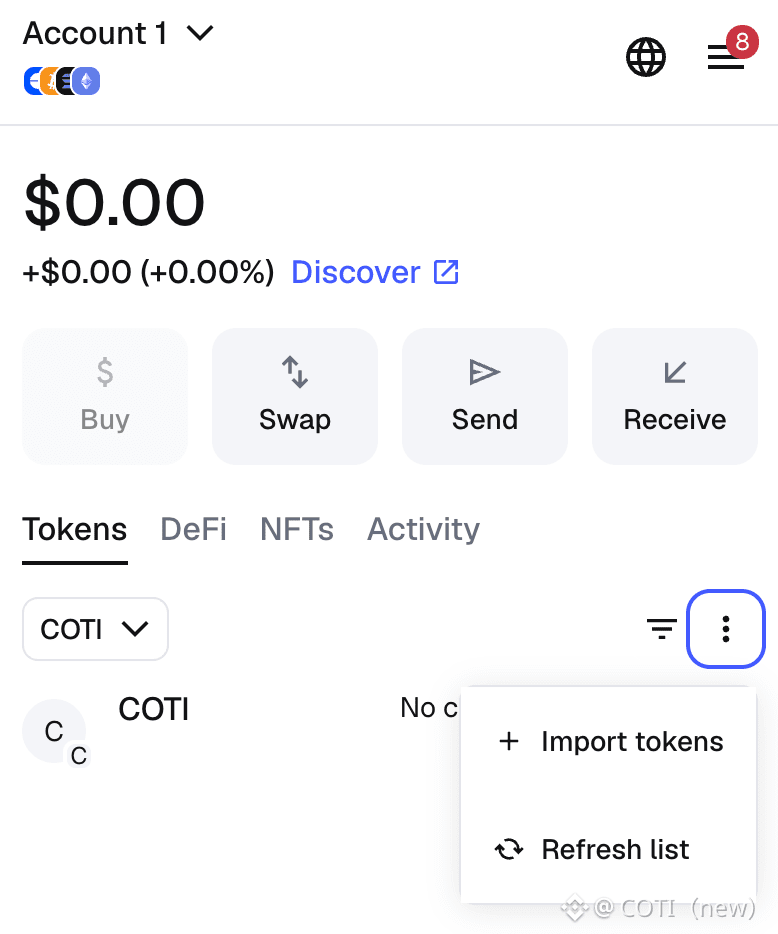
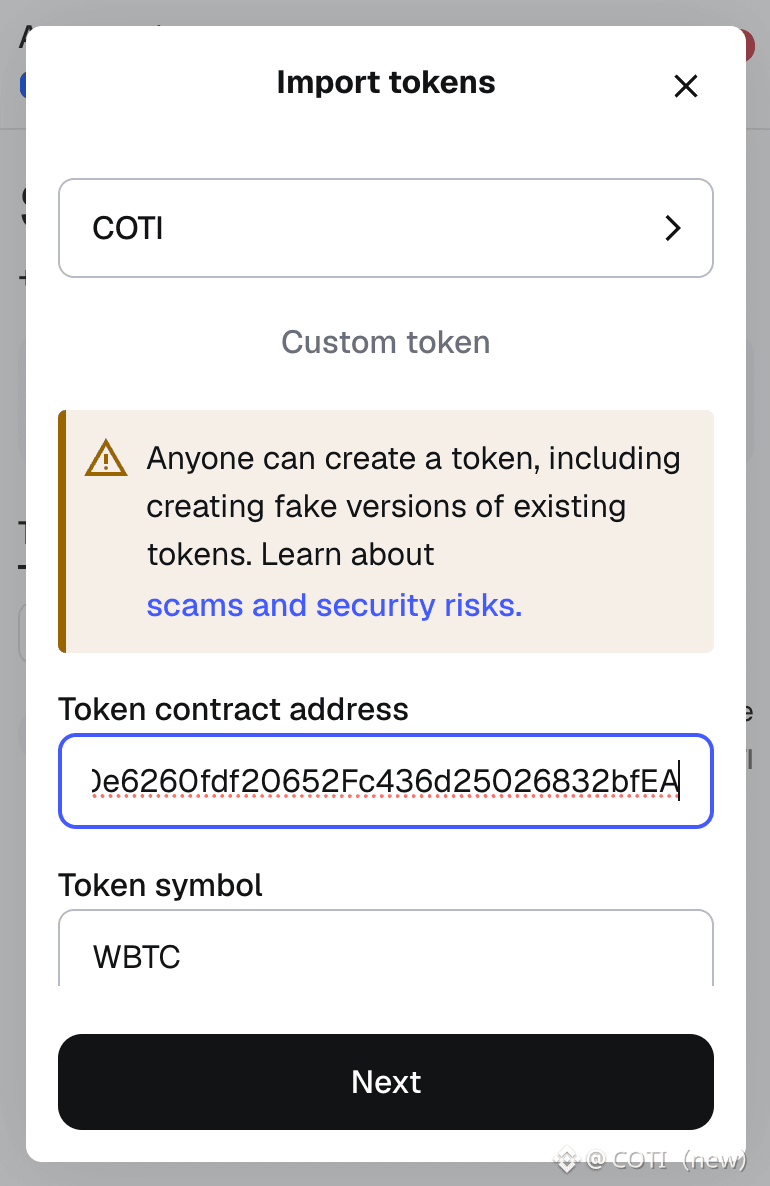
Visit the COTI Docs here to find the contract address for the token you wish to add (USDT, USDC, wADA, wETH, wBTC etc)
Copy the address and paste it into the Token Contract Address Field
That’s it. The token will appear in your wallet and you will be able to see the balance you hold.
For COTI updates and to join the conversation, be sure to check out our channels:
Website: https://coti.io/
COTI Earn: https://earn.coti.io/earn
X: https://twitter.com/COTInetwork
YouTube: https://www.youtube.com/channel/UCl-2YzhaPnouvBtotKuM4DA
Telegram: https://t.me/COTInetwork
Discord: https://discord.gg/9tq6CP6XrT
GitHub: https://github.com/coti-io