
(A real user case — shared so others won’t fall victim)
A new scam targeting traders has been spreading lately, especially those who use TradingView or crypto platforms. The scam promises “TradingView Premium for 1 year — FREE” if you install a desktop app.
In reality, the installer plants a fileless PowerShell trojan (JSCEAL) that silently executes malicious scripts in the background.
This article is based on a real incident experienced by a trader — shared to help others stay safe.
🎯 How the Scam Works
The victim sees a fake offer:
“TradingView Premium free for 1 year”
“Free upgrade — no payment required”
“Install TradingView Desktop to activate Premium”
The download link looks like this:
hxxps://jimmywarting.github.io/StreamSaver.js/app-download-users.com/775981/installer.exe
This is NOT TradingView.
This is NOT official software.
This is NOT from Microsoft or GitHub.Scammers use GitHub Pages to make the URL look trustworthy.
The victim downloads and runs installer.exe.
The “installer” secretly creates a Windows Scheduled Task:
MicrosoftResourcesInstallerV1-vzp7j
Inside the task are multiple commands:
powershell -NoProfile -EncodedCommand ...
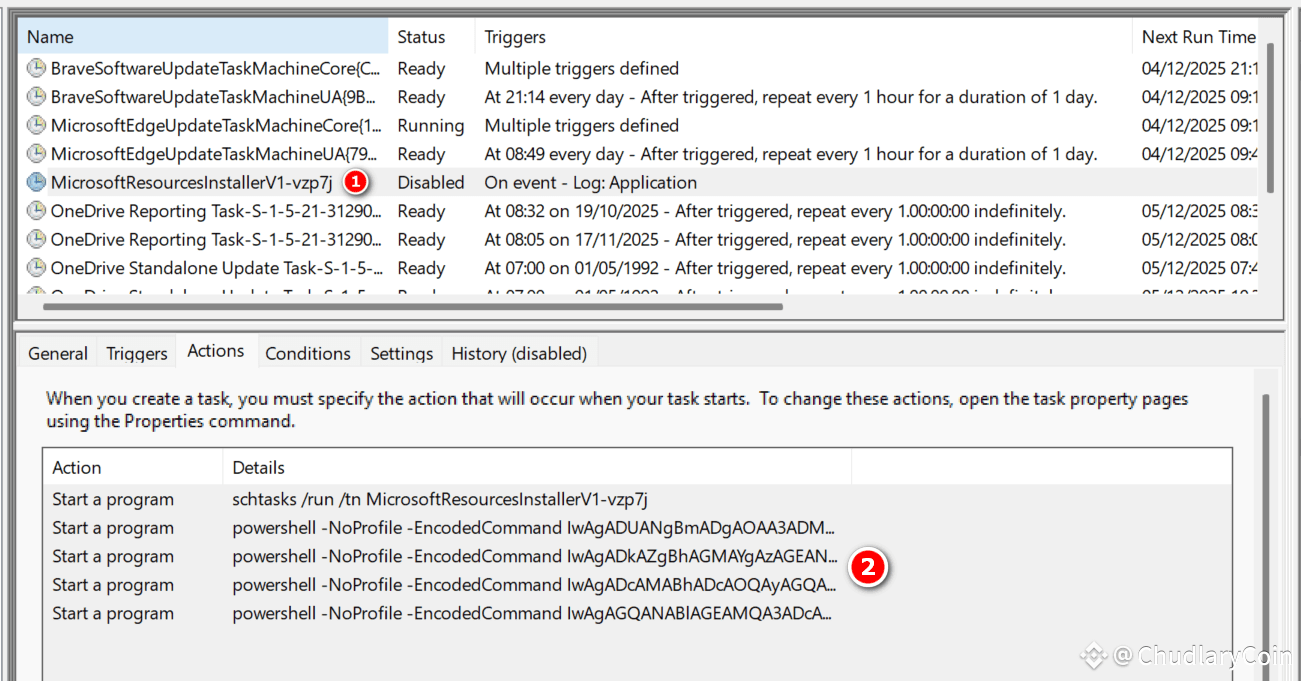
These are base64-encoded malicious scripts known as JSCEAL fileless trojan payloads.
🧨 Why JSCEAL Is Dangerous
JSCEAL is a fileless PowerShell malware, meaning:
No virus files are dropped to disk
The code executes entirely in memory
Persistent via Scheduled Task
Hard for traditional antivirus to detect
Can steal browser data and sessions
Runs silently with SYSTEM privileges
In this real case, ESET Antivirus detected:
PowerShell/JSCeal.B trojan
via AMSI (malicious scripting interface)
🔍 How the Victim Noticed Something Was Wrong
Whenever TradingView was opened in the browser, ESET repeatedly showed warnings:
PowerShell launching suspicious encoded scripts
Execution blocked by AMSI
Activity tied to PowerShell modules
But:
No TradingView program existed in Control Panel
No installed TradingView Desktop files
No malicious services or registry entries
Nothing suspicious in AppData
Yet PowerShell kept firing
After a deep investigation, the root cause was found:
👉 A hidden Scheduled Task created by the fake “TradingView installer.”
🛠 How to Remove the Malware (Full Solution)
If you clicked a similar link, follow these steps immediately:
✔ STEP 1 — Delete the malicious Scheduled Task
Run PowerShell as Administrator:
schtasks /delete /tn MicrosoftResourcesInstallerV1-vzp7j /f
This removes the malware’s persistence.
✔ STEP 2 — Clear Browser Cache & Service Worker
Close Microsoft Edge completely, then delete:
%LocalAppData%\Microsoft\Edge\User Data\Default\Service Worker
%LocalAppData%\Microsoft\Edge\User Data\Default\Code Cache
%LocalAppData%\Microsoft\Edge\User Data\Default\Cache
This wipes malicious scripts left by the scam website.
✔ STEP 3 — Reset Microsoft Edge
Settings → Reset → Restore settings to their default values.
✔ STEP 4 — Full Antivirus Scan
Run a deep scan using ESET, Malwarebytes, or Windows Defender.
✔ STEP 5 — Change important passwords
Especially:
Email
TradingView
Binance
Online banking / wallets
Use a secure device to change them.
🟩 Lessons Learned
TradingView never gives away free 1-year Premium plans.
Only download TradingView from the official site:
https://www.tradingview.com/desktop/
GitHub Pages links can be abused by scammers.
Encoded PowerShell commands in Scheduled Tasks = almost always malware.
Fileless malware is harder to detect and remove than normal .exe viruses.
🟧 Final Warning
Scammers love impersonating popular platforms like:
TradingView
Binance
 BTC97,033.1+1.85%
MetaTrader
Crypto exchanges
They prey on traders looking for tools, discounts, or upgrades.
If something claims to be “free premium,” “lifetime access,” or “1-year upgrade,” always assume it’s a scam unless confirmed by the official website.
Stay cautious and keep your system clean. Happy Trading !