
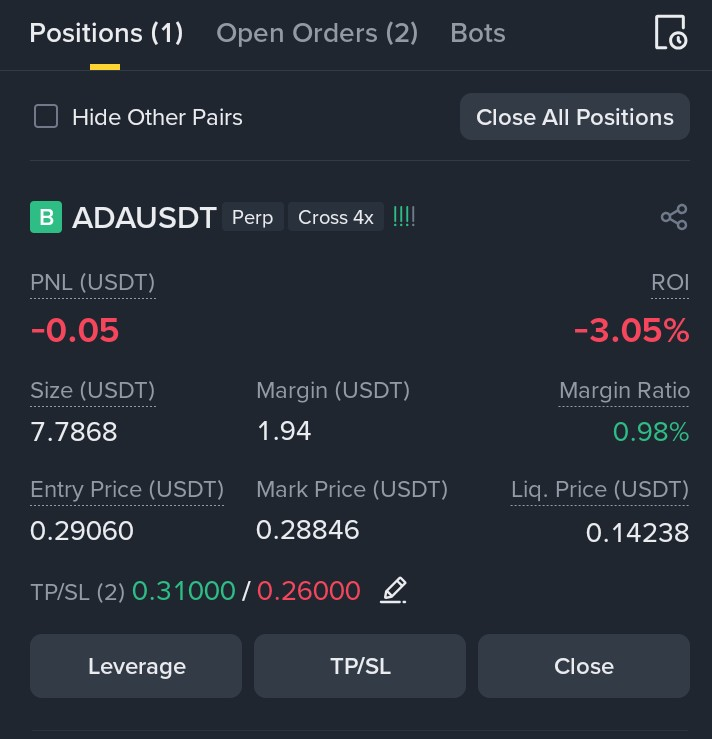
When you open a future trade, there are several important parts to understand. Let’s break them down simply
Your Current Positions & Orders**
- Positions:
This shows how many futures contracts you currently have open.
Example: You have 1 active trade in Bitcoin futures.
- Open Orders:
These are pending orders that you’ve set but haven’t executed yet, usually including:
- Take Profit (TP): The price at which you want to automatically close your trade to lock in profits.
- Stop Loss (SL): The price at which you want to automatically close your trade to limit losses.
Example: You set a TP at $50,000 and an SL at $48,000 for your Bitcoin trade.
- Close All Positions:
A button that instantly closes all your open futures trades at the current market price. Use it carefully!
2. Pair & Contract Info
- Trading Pair:
The two assets you’re trading.
Example: ADAUSDT means trading Cardano against USDT (Tether).
- Perpetual Futures:
A type of futures contract that doesn’t expire. You can hold it as long as you want.
- Cross Margin Mode:
Uses your entire Futures wallet balance as margin.
Example: With 10x leverage, you control a position 10 times bigger than your margin, amplifying both gains and losses.
3. Profit & Loss (PNL)
- PNL (USDT):
Shows your unrealized profit or loss in USDT (Tether).
Example: If your trade is up $100, it means you’re currently making that profit.
- ROI:
The percentage gain or loss relative to your margin.
Example: If you invested $100 and gained $20, your ROI is 20%.
4. Position Size & Margin
- Position Size (USDT):
Total dollar value of your trade.
Example: You open a $1,000 Bitcoin futures position.
- Margin (USDT):
The actual amount of money you put into the trade.
Example: You put $50 as margin to open a $1,000 position using leverage.
- Margin Ratio:
Shows how close you are to liquidation (getting your position closed automatically).
Example: 0.98% means you’re very safe for now; higher percentages mean higher risk.
5. Price Details
- Entry Price:
The price at which your trade was opened.
Example: You bought it for $30,000.
- Mark Price:
Binance’s “fair” price used to calculate your profit/loss and liquidation risk.
Example: The mark price is $29,800, slightly different from your entry price.
- Liquidation Price:
The price at which your position will be force-closed if it hits this level.
*Example:* If the mark price drops to $28,500, your position might be liquidated.
6. Take Profit & Stop Loss (TP / SL)
- TP (Take Profit):
Your target price to automatically close the trade with a profit.
Example: Set TP at $31,000; if price hits this, your trade closes with profit.
- SL (Stop Loss):
Your safety net to limit losses.
Example: Set SL at $29,000; if price drops there, the trade closes to prevent bigger losses.
- Edit Icon:
Lets you modify these levels anytime.
7. Bottom Buttons & Controls
- Leverage:
Adjust how much bigger your position is compared to your margin.
Example: Change from 4x to 2x leverage to reduce risk.
- TP/SL:
Add, change, or remove your profit and stop loss settings.
- Close:
Manually close your position at the current market price whenever you want.
This simple overview helps you understand the key parts of managing a futures trade. Each element plays a crucial role in controlling your risk and maximizing your potential profits.
‼️Follow and Support me by trading from below
👇


