Cryptocurrency trading can be tricky, especially in volatile markets like Bitcoin. But with a Futures Grid Bot, you can automate your trades, capture profits in sideways markets, and manage risk efficiently. In this guide, we’ll show you step-by-step how to set up a BTC Grid Bot for 60,000 – 75,000 USDT, understand how it takes long and short trades, and use TP/SL for controlled profits and losses.
1️⃣ What is a BTC Grid Bot?
A Futures Grid Bot is an automated trading tool that places multiple buy (long) and sell (short) orders at defined price levels. Instead of manually timing the market, the bot:
Buys at lower grid levels → Sells at higher levels (Long trades)
Sells at higher grid levels → Buys back at lower levels (Short trades)
Captures profits repeatedly in sideways or choppy markets
Neutral Mode allows it to take both long and short trades simultaneously, maximizing profit potential in fluctuating markets.
2️⃣ Why Use a Grid Bot for BTC?
Automation – No need to watch charts 24/7
Profit in Sideways Markets – Even if BTC doesn’t trend strongly up or down
Micro Profits Add Up – Multiple small gains accumulate over time
Risk Management – TP/SL and isolated margin minimize losses
3️⃣ How BTC Grid Bot Trades Long & Short (60k – 75k)
Grid Range: 60,000 – 75,000 USDT
Grids: 45
Mode: Neutral (long + short)
Long Trades (Buy Low → Sell High)
Bot buys BTC at lower grid levels, e.g., 60,000 – 67,500
Sells automatically at higher grid levels to capture profit
Short Trades (Sell High → Buy Low)
Bot sells BTC at higher grid levels, e.g., 67,500 – 75,000
Buys back at lower levels to capture profit
Neutral Mode ensures both sides operate continuously → micro profits captured whether market moves up or down.
4️⃣ Step-by-Step BTC Grid Bot Setup
Step 1: Open UM Grid Bot
Go to Futures → Bots → UM Grid → Create New Bot
Step 2: Select Pair
BTCUSDT
Step 3: Set Mode
Neutral → Long + Short
Step 4: Margin & Leverage
Margin: Isolated (risk limited to invested capital)
Leverage: 15x – 20x
Step 5: Price Range
Lower: 60,000
Upper: 75,000
Step 6: Grids
45 grids
Step 7: TP / SL
Take Profit: 15%
Stop Loss: 10%
Close All Positions on Stop: ON
Step 8: Advanced Settings
Trailing Up / Trailing Down: OFF
Grid Trigger: OFF
Step 9: Create Bot
Review → Create → Bot starts automatically
5️⃣ Understanding ROI and Profits
Each grid trade earns micro profits ≈ 0.5% – 1%
TP ensures total profit target ≈ 15%
SL ensures losses don’t exceed 10% of invested capital
Example:
Buy at 61,500 → Sell at 65,000 → Profit ≈ 0.5% per grid
Sell at 74,000 → Cover at 72,500 → Profit ≈ 0.5% per grid
6️⃣ Monitoring & Risk Management
Even automated bots need monitoring:
Check every 2–3 hours for large price swings
Pause bot during major news events or strong trends
Withdraw profits periodically → avoid greed
Adjust grid if BTC moves out of range
Key Rule:
Grid Bot trades only within the set range.
Price outside the range → bot idle → manual action required
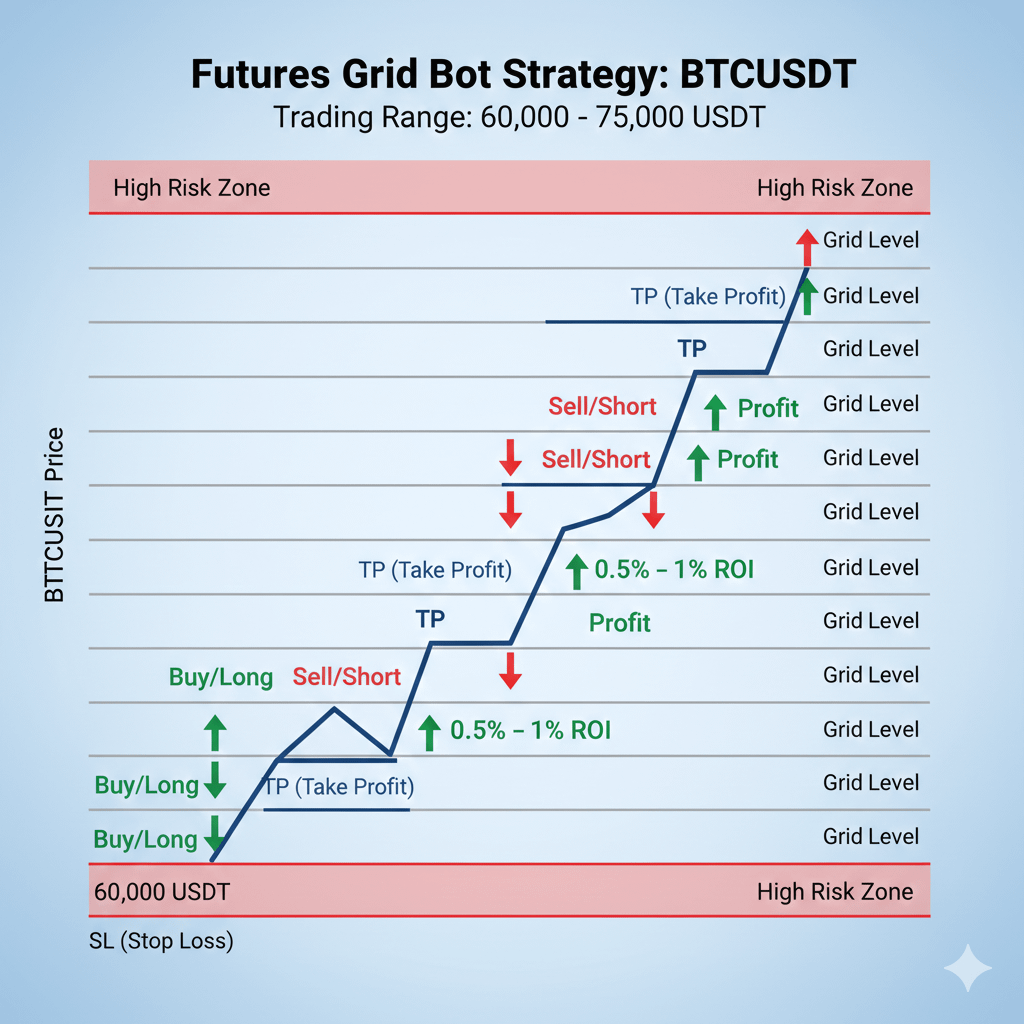
7️⃣ Visual Guide
A diagram helps understand bot operations:
Grid levels labeled from 60,000 → 75,000
Green arrows → Buy / Long positions
Red arrows → Sell / Short positions
Small green arrows → realized profit per grid
Blue line → Take Profit
Red line → Stop Loss
Highlighted zones outside 60k–75k → High Risk Zone
This visual shows how long and short trades work together to capture profit continuously.
8️⃣ Key Tips for Beginners
Start with 100–200 USDT to test the bot
Use Isolated Margin + moderate leverage (15x–20x)
Keep grid range wide to reduce liquidation risk
Withdraw profits regularly
Pause bot during strong uptrend or downtrend
🔥 Final Thoughts
The BTC Futures Grid Bot (60k–75k) is a powerful tool for automated trading. With proper setup, TP/SL, isolated margin, and careful monitoring, even beginners can profit from BTC’s sideways moves.
Remember: Start small, follow the grid plan, monitor market trends, and gradually increase capital as you gain confidence.