
Here's a clear, up-to-date step-by-step guide on how to buy cryptocurrency on Binance (as of 2026). Binance offers several beginner-friendly methods: Credit/Debit Card (fastest but with fees), P2P Trading (often cheapest, especially in regions like Uganda with local options like mobile money/bank transfers), Bank Transfer, and more. Always start small, as crypto is volatile.Important reminders:
Complete KYC (identity verification) for most fiat methods and higher limits.
Enable 2FA (Google Authenticator recommended).
Only use the official app/website: generallink.top or the Binance app.
Fees vary by method/region (e.g., card ~1-3%, P2P often 0%).
1. Log In or Sign Up on Binance
Go to https://www.generallink.top or open the Binance app.
Sign up (email/phone) if new, or log in.
Complete Identity Verification (upload ID + selfie) → unlocks buying with fiat.
2. Choose Your Buying MethodNavigate to Buy Crypto (top menu or homepage button). Options include:Method A: Buy with Credit/Debit Card (Quick & Easy)Ideal for beginners wanting instant purchase.
Click Buy Crypto → Credit/Debit Card (or "Express Buy"/"Bank Card").
Select the cryptocurrency (e.g., BTC, ETH, USDT — start with USDT for stability).
Choose your fiat currency (e.g., USD, EUR; check if UGX or local supported).
Enter the amount you want to spend (or crypto to receive).
Add/bind your Visa/Mastercard (or use Apple Pay/Google Pay if available).
Review details: price, fees (~2-3%), total.
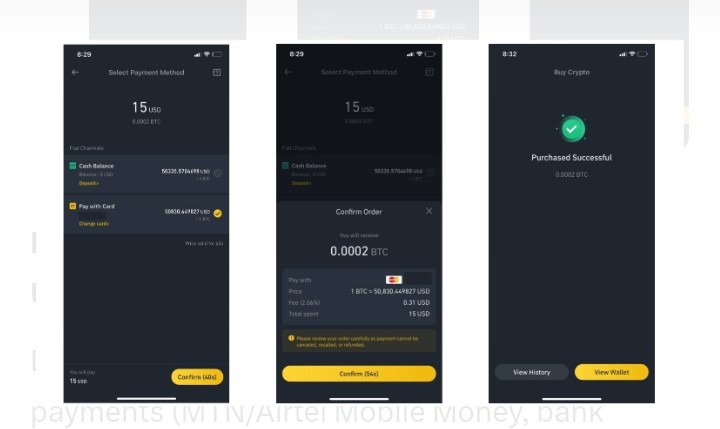
Confirm and complete payment → crypto arrives in your Spot Wallet instantly.
cryptohopper.com
generallink.top
generallink.top
Method B: Buy via P2P (Recommended for Uganda/East Africa — Low/No Fees)Buy directly from other users with local payments (MTN/Airtel Mobile Money, bank transfer, etc.).
Go to Buy Crypto → P2P (or direct: p2p.generallink.top).
Select Buy, choose crypto (e.g., USDT first), fiat (UGX if available, or USD/local).
Filter: Payment method (e.g., Mobile Money, Bank Transfer), amount, sort by price/completion rate.
Pick a seller: Look for high completion rate (95%+), positive feedback, verified merchant, fast release time.
Enter amount → see details (price, limits).
Click Buy → chat opens; follow seller's instructions to pay (e.g., via mobile money).
Send payment proof → seller releases crypto to your Funding Wallet.
Confirm receipt → release funds if needed (escrow protects you).
generallink.top
generallink.top
generallink.top
generallink.top
Pro tip for P2P: Start with small trades. Choose sellers with "Verified Merchant" badge. Binance escrow holds crypto until you confirm payment.Method C: Bank Transfer or Other Fiat Deposit
Buy Crypto → Bank Transfer (or Fiat Deposit → select method like SEPA if available).
Follow on-screen instructions to deposit fiat (may take 1-3 days).
Once funds arrive in Fiat/Spot Wallet → use Convert (easy swap) or Trade → Spot to buy crypto (e.g., USDT/USD → BTC/USDT).
3. After Buying: What Next?
Check your Wallet (Spot or Funding) → crypto appears.
Hold, trade on Spot, stake in Earn, or withdraw to personal wallet (not your keys, not your coins).
For quick swaps: Use Convert tab (low/no fees for small amounts).
Quick Comparison Table
Method
Speed
Fees
Best For
Availability in Uganda/Africa
Credit/Debit Card
Instant
1-3%
Beginners, small amounts
Yes (Visa/Mastercard)
P2P
5-30 mins
Usually 0%
Low cost, local payments
Excellent (Mobile Money, Banks)
Bank Transfer
1-5 days
Low/low
Larger amounts
Varies by region
Start with P2P if you're in Uganda — it's flexible and cost-effective. For official details, visit:
https://www.generallink.top/en/how-to-buy/bitcoin (adapt for any coin)
Binance Academy or in-app guides.
If you run into issues (e.g., specific payment not showing), share your region or method, and I can help troubleshoot! Stay safe — ignore DMs claiming to be. #HowtobuycryptocurrencyonBinance #Guidetobuycryptoonbinance #BinanceAcademy #2FA #Debitcard

